
Traditional capture ends when a document is scanned. Umango starts there, capturing information at the source, understanding the content, validating critical data and routing documents and metadata into the right business system.
Umango gives organisations one platform for document intake across multiple channels. This makes it ideal for hybrid workplaces, distributed teams, remote branches, mobile workers and any organisation that needs consistent capture rules across different locations and devices.
Users scan, classify and validate at the device. Embedded apps on Konica Minolta, Xerox, Sharp, Ricoh, Kyocera, Toshiba, HP and more.
Capture, profile and validate documents from anywhere on the network. Drag-and-drop, scan or import - no install required.
Capture images and documents from remote sites or mobile teams. Cloud-connected workflows for field operations.
Support desktop scanning workflows alongside MFD and cloud capture. Same jobs, same rules, same destinations.
Automate intake from existing file locations. Network shares, SFTP and cloud folders monitored continuously.
Turn inbound emails and attachments into actionable data. Route by sender, subject, content or AI classification.
Process documents from SharePoint, OneDrive, Google Drive, Box, Dropbox and many other cloud repositories.
Integrate third-party systems and custom portals. Push documents in, pull metadata and results out.
Import metadata and images from existing DMS or ECM repositories. Migrate without losing context.
Umango brings AI into the capture process so documents can be classified, queried, translated, analysed and processed with less template configuration. Identify fields without rigid layouts. Train custom AI document types around your own business. Ask natural language questions and get structured answers back.
"Get the employee name from this document. Then classify the document and return the values as {employee}/{classification}."
— Example AskAI promptNatural language is the new template. With AskAI, your team writes prompts instead of rules and Umango handles the extraction, classification or validation in the background.
Ask questions about documents and extract answers without complex templates.
Identify fields and key data without relying only on fixed layouts.
Train Umango around your own document types and workflow requirements.
Improve automation for AP invoice processing with line-level accuracy.
Ask questions about image content and make decisions on visual information.
Translate metadata or entire documents while maintaining workflow structure.
Recognise handwritten notes, forms and signatures across multiple languages.
Umango's conversion engine doesn't just OCR, it rebuilds. Tables come back as real tables. Paragraphs flow. Layouts, columns and regions are preserved exactly as they appeared on the source. The output is something you can search, edit, archive or push into any downstream system.
Make every scanned page findable. Umango embeds an invisible OCR text layer behind the original image, so the document looks identical but every word, number and field is fully searchable across your DMS, file shares and email archives.
Long-term retention done right. Output documents in ISO-compliant PDF/A - the format trusted by government, legal and records teams for archival preservation. Self-contained, future-proof, and audit-ready.
Reconstruct image-only sources as live DOCX, RTF, XLSX or HTML. Edit, restyle, repurpose. Send tables straight to Excel. Drop transcripts into Word. No retyping, no copy-paste cleanup.
Many tools extract text as a flat stream and call it done. Tables collapse into run-on lines. Columns merge. Headings lose their hierarchy. The output technically contains the words but it isn't usable.
Umango's engine analyses the page as a whole: detecting tables, columns, headings, lists and reading order. The result is a document that looks and behaves like the original, but is now structured data you can search, edit and act on.
Fonts, spacing, columns and page breaks reconstructed to match the source.
Cells, rows and headers come through as live table structure, straight into XLSX or DOCX.
Multi-column layouts, sidebars and form regions are detected and recreated in order.
Latin, Cyrillic, CJK, Arabic, Hebrew and mixed-script documents handled natively.
Convert entire historical archives at scale. Thousands of pages per job, unattended.
PDF/A outputs meet long-term retention standards. Text layers improve screen-reader accessibility.
Digitise decades of paper into PDF/A. Searchable, indexed, compliant without rebuilding the archive from scratch.
Convert scanned supplier invoices and forms into editable spreadsheets and documents ready for reconciliation, reporting or re-use.
Turn old reports, contracts and reference material into live, editable Word and HTML searchable, copyable and ready to repurpose.
Umango runs natively on multifunction devices from the world's leading manufacturers. A full-colour, gesture-friendly panel experience that turns the copier from a scanner into an intelligent capture and processing point.
Operators see the jobs that matter to them, kick off scans, validate data and route documents to where they need to go, all without leaving the device. Or they can start at the device and finish back at their desk - they choose.
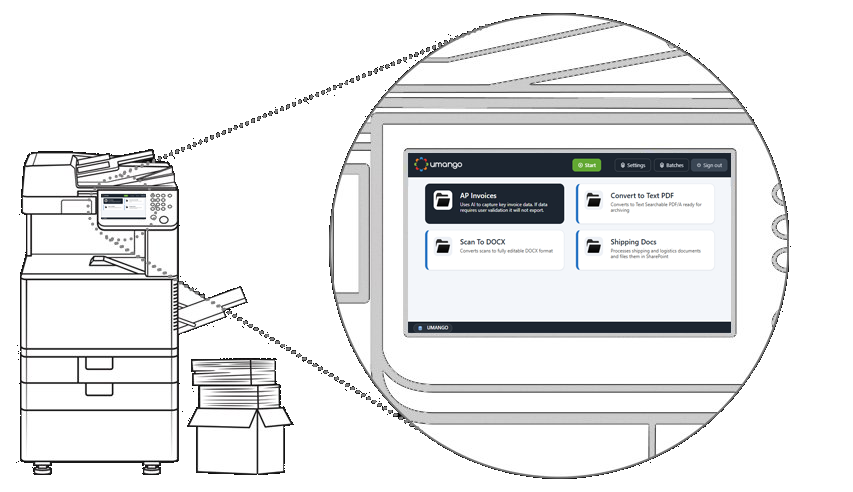
Umango extends the value of multifunction devices by turning them into intelligent capture points. Validate metadata, classify documents and route information directly from the device panel before documents reach business systems.
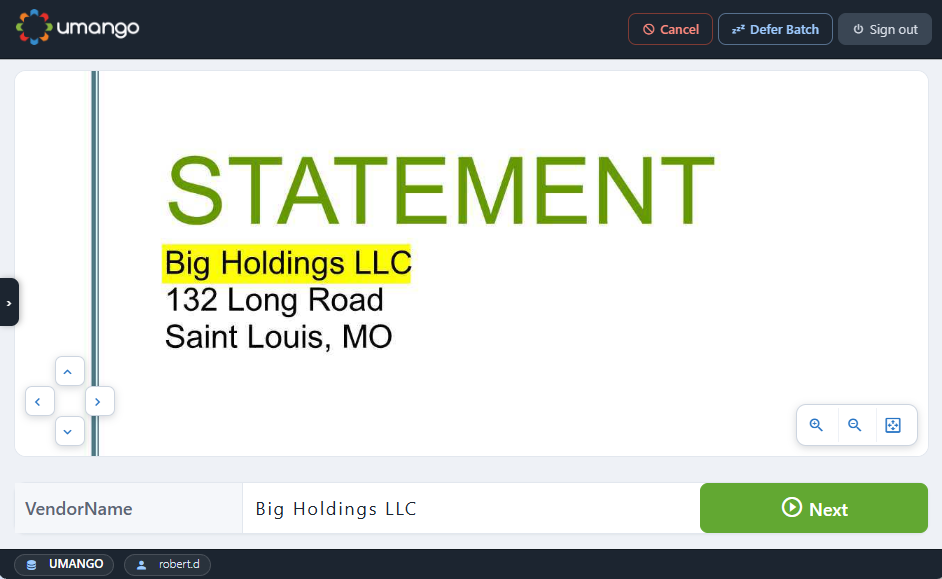 MFD panel · Data Validation
Draw zones on a sample document, define rules and lookups, and Umango will apply them consistently across every capture source - at the panel, in the browser or on mobile. Data is checked before it ever reaches a downstream system.
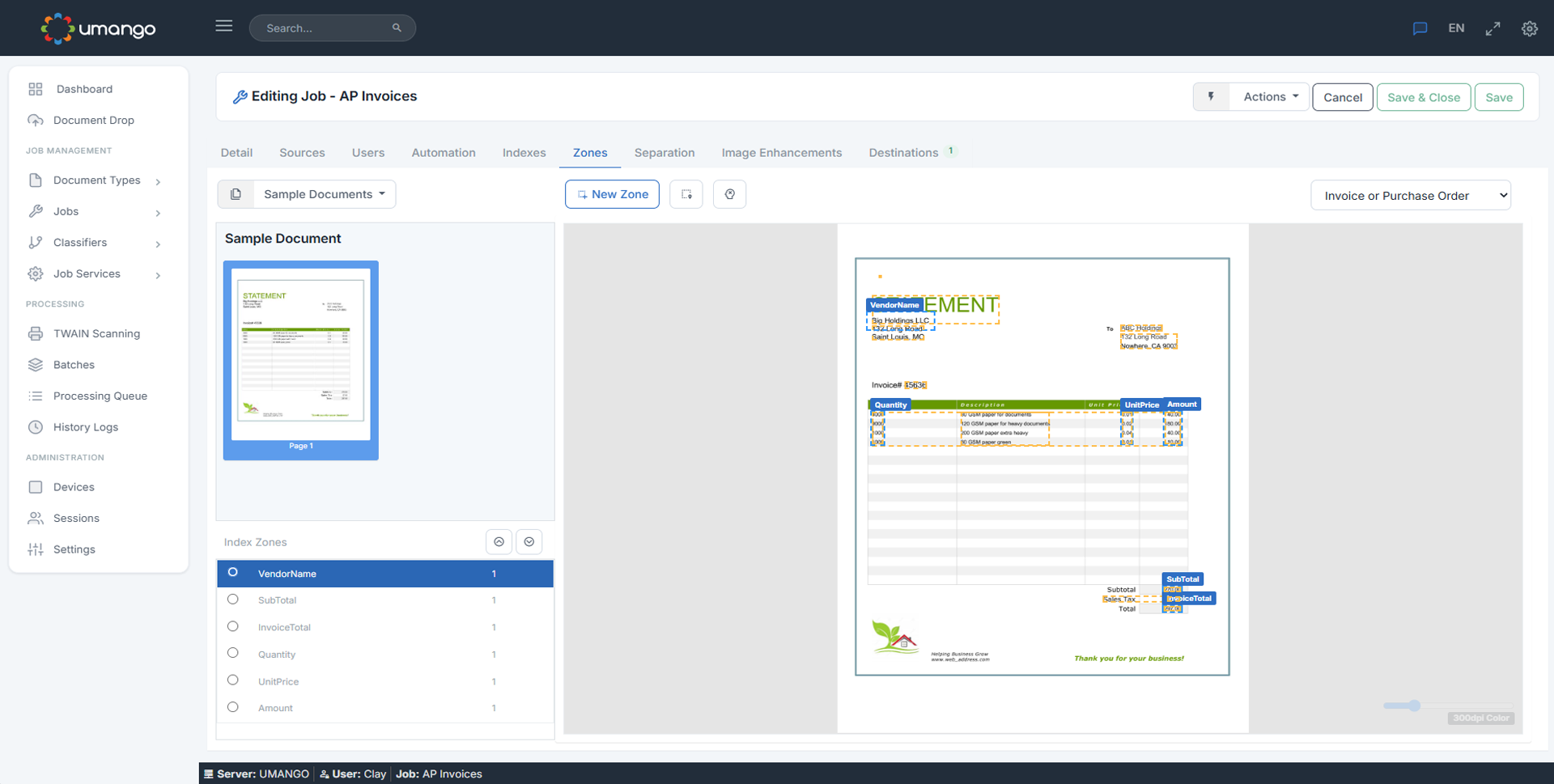 Tablet · Job editor
Native embedded apps across the major MFD manufacturers, plus deep integrations with best-in-class OCR and AI engines.







Every organisation has different infrastructure, security, regional and operational requirements. Umango is designed to fit the customer's environment, not force them into a single model.
Fully managed, single-tenant, containerised instances hosted in Azure. Reduces infrastructure complexity and supports modern work-anywhere scenarios.
Local capture and validation, with selected AI services or cloud capabilities supporting advanced processing. Ideal for local workflow control plus AI-powered processing.
For organisations with strict infrastructure, security or compliance requirements. Local control with full capture, validation, routing and workflow capabilities.
The limited cloud SaaS option is available directly from Umango. The more feature-rich offerings are sold exclusively through our authorised reseller channel - learn how to buy.
Umango helps organisations bridge paper, email, cloud repositories, business applications and document management platforms. The connector model supports targeted connectors and standard integration methods alike.
OneDrive · Google Drive · Dropbox · Box · ShareFile · SharePoint 365
SharePoint · DocuWare · M-Files · FileBound · Therefore · DocuShare · Alfresco · iManage
Salesforce export · CRM connectors · ERP integration · Custom business applications
XML · CSV · JSON · ODBC · WebDAV · FTP · web request · scripts
Import / export API · Third-party web connectivity · Custom integrations · Webhooks
Import metadata and images from existing repositories · Database lookups for live validation
Lightweight architecture, browser-based admin, no IIS requirement.
Visual job editor, AI-assisted setup, no-code rules.
Designed for everyday business users at the panel or browser.
Native MFD experience across all major device brands.
No installation, no infrastructure. Spin up a managed Umango Cloud trial and start processing real documents in minutes.